
MySQL – test your backup by restoring it as a replica
Published By Krzysztof Książek Lab
Lab write-up. A hands-on environment built and run by the author, not a customer engagement.
Environment described in the article: Percona Server for MySQL 8.4.10-10.1, Percona Operator for MySQL 1.2.0, local kind Kubernetes cluster.
A backup job that reports Succeeded has proven that the backup process finished. It has not proven that you can recover the database.
The test that settles recoverability, without taking production down, is this: restore the backup into a separate cluster, attach that cluster as a replica of the live source, let it catch up, and compare the data. If the backup was incomplete or internally inconsistent, replication refuses to start, or it applies a transaction onto a row the backup does not actually contain and stops with an error. If the restored copy catches up and the tables match, you have a usable database — and, incidentally, a standby.
This post walks through that test as we ran it. The live source kept taking writes. The verification cluster was disposable. It builds on the MySQL replication lab; you can start here with a fresh deployment.
What this lab is
Local kind Kubernetes, Percona Operator for MySQL 1.2.0, Percona Server 8.4.10-10.1, async GTID (global transaction identifier) replication (one source, one replica), XtraBackup (a physical backup of the MySQL data directory) into in-cluster MinIO (S3-compatible object storage). The dataset is sysbench oltp_read_write prepare: 10 tables × 200,000 rows. Point-in-time recovery uses a binlog server that registers as a replica and streams binary logs to a second MinIO bucket. Orchestrator is installed and is not this post’s subject.
The whole lab — Ansible roles, custom resources, playbooks and tests — lives in github.com/ghkrzysztof-ksiazek/database-labs, directory 20260911-mysql-replication-backups. Clone and run commands from that directory:
git clone https://github.com/ghkrzysztof-ksiazek/database-labs.git
cd database-labs/20260911-mysql-replication-backups
Twelve Ansible scenarios surround the backup path. They are grouped in the catalogue as:
Scroll horizontally to see all columns when needed.
| Group | Scenarios | What they establish |
|---|---|---|
| Backups are produced | t01–t06 | Objects exist, on demand and on a schedule, from the right pod, and old ones get pruned |
| Backups restore | t07–t11 | Data comes back — whole, after a drop, and to a chosen point in time — and a bad request fails instead of lying |
| Backups are usable | t12 | The restored copy replicates from the live source, catches up, and matches |
This post is about the third group. The first two are necessary machinery; they are not the proof. How the operator actually backs up, restores, and replays binlogs is in backup architecture notes. Measured runs live in results/.
Picture the test
The verification cluster never talks to the source backup custom resource. It reads the XtraBackup object from MinIO, starts as its own MySQL instance, then replicates everything written since that backup.
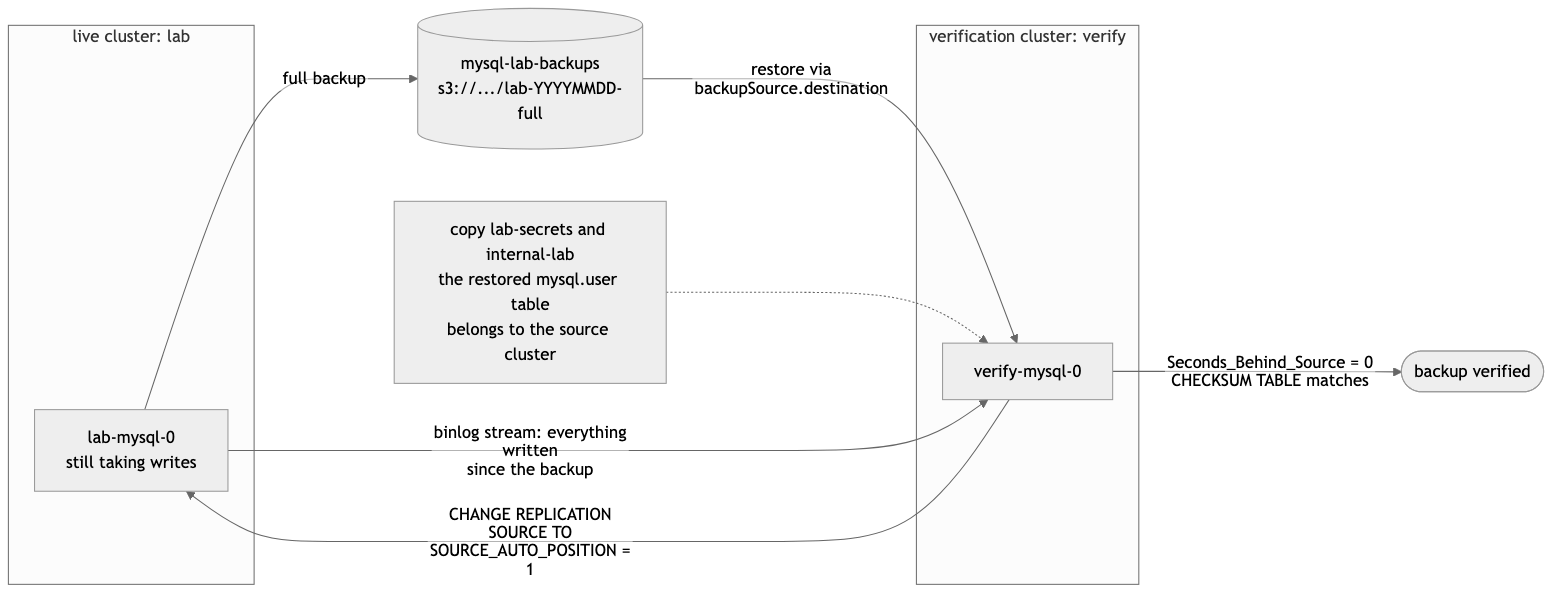
The MinIO node label is schematic. The measured t12 object on the validation run is s3://mysql-lab-backups/lab/lab-2026-09-12-10:36:24-full. Source: restore-as-replica.mmd. Backup creation and binlog streaming: architecture.mmd. Physical restore plus binlog replay: pitr.mmd.
t12 — Restore into a new cluster, attach as a replica, catch up
The lab scenario is t12 (ansible/roles/t12_restore_as_replica/). It does not depend on an earlier backup; it takes its own full base. On the ordered validation run this scenario took 118 s.
1. Take a full backup and keep both destination and storage
A backup is a PerconaServerMySQLBackup Kubernetes custom resource (a backup object the operator watches). When it finishes, status.destination is the object-storage path a different cluster can restore from, and status.storage is the S3 definition the operator used — including prefix.
On the ordered validation run the t12 base was:
BASE_BACKUP=t12-base
BASE_DESTINATION=s3://mysql-lab-backups/lab/lab-2026-09-12-10:36:24-full
(from 12 September 2026 validation report). Do not hand-edit that destination into a restore and then invent a storage block that only names the bucket. This operator locates the backup using the storage definition. The t12 role copies status.storage wholesale:
apiVersion: ps.percona.com/v1
kind: PerconaServerMySQLRestore
metadata:
  name: t12-restore
spec:
  clusterName: verify
  backupSource:
    destination: s3://mysql-lab-backups/lab/lab-2026-09-12-10:36:24-full
    storage:
      type: s3
      s3:
        bucket: mysql-lab-backups
        credentialsSecret: minio-backup-credentials
        prefix: lab
There is no backupName: t12-base. That field would point at a backup CR on the source cluster. Cross-cluster restore is backupSource.destination plus the original storage metadata. Supplying the bucket alone makes this operator search the wrong object prefix.
The second shakeout recorded the failure mode in shakeout2-run.md: t12 FAILED in 37s with backup not found in storage.
2. Copy the source credentials, including the secrets you did not create
The restored datadir contains the source cluster’s mysql.user table. A brand-new verify cluster gets brand-new generated passwords. The moment its datadir is replaced, those passwords are wrong. The operator cannot log in to the database it has just restored. The failure looks like a crash-loop or a stuck restore — which reads like a corrupt backup.
Copy three secrets, not one:
COPIED lab-secrets -> verify-secrets
COPIED internal-lab -> internal-verify
COPIED lab-ssl -> verify-ssl
lab-secrets is the user-facing secret. internal-lab is operator-generated and holds operator, replication, monitor, orchestrator, heartbeat, and xtrabackup. Copying only the user secret is not enough. lab-ssl is the TLS material the later SOURCE_SSL=1 replication channel needs; the t12 role copies it when it exists. This is a laptop lab with intentionally simple credentials, not a production secret-management pattern.
3. Create a disposable one-node cluster
verify is a PerconaServerMySQL with mysql.size: 1, HAProxy off, Orchestrator off, PITR off (verify-cluster.yaml.j2). It exists to restore into and replicate from. It is not a second production topology.
4. Restore, then write a marker the backup cannot contain
After requesting the restore, t12 writes a unique table of 20,000 rows on the live source. Those rows are newer than the backup.
Before replication starts, the restored copy must not have them. The validation run recorded:
WRITES_AFTER_BACKUP=20000
RESTORE_STATE=Succeeded
RESTORED_TABLES=10
RESTORED_POST_BACKUP_ROWS=0
RESTORE_SECONDS=65
Succeeded here means the restore job finished. The marker assertion is what proves the restored datadir is actually that backup, not an already-caught-up copy.
5. Require a distinct identity, then replicate with auto-position
The restored instance must not share the source’s server_uuid or server_id. Measured:
SERVER_UUID live=71463f98-ae95-11f1-aeda-1e96d50fb941 restored=e55cafc3-ae95-11f1-a099-1e881dd5cec9
SERVER_ID live=35921690 restored=39133310
RESTORED_GTID_PURGED=5fccd34e-ae85-11f1-a9d5-0e01098e2e59:1-925,71463f98-ae95-11f1-aeda-1e96d50fb941:1-55,a84e643f-ae94-11f1-8ddd-2ec4c43ab3c3:1-52,d97cef97-ae93-11f1-ba46-16c9a8133dba:1-71,f25e09c8-ae91-11f1-b5a6-72d21a7478f2:1-214
XtraBackup restored gtid_purged with the data. The replica already knows which transactions it contains. No binlog filename, no offset:
CHANGE REPLICATION SOURCE TO
  SOURCE_HOST='lab-mysql-0.lab-mysql.mysql.svc.cluster.local',
  SOURCE_PORT=3306,
  SOURCE_USER='replication',
  SOURCE_PASSWORD='…',
  SOURCE_SSL=1,
  SOURCE_AUTO_POSITION=1;
SET GLOBAL super_read_only=ON;
START REPLICA;(SOURCE_HOST is the validation-run value. The password comes from internal-lab’s replication key.)
6. Catch up, then compare data — lag is not the pass criterion
t12 waits until both replication threads are running and Seconds_Behind_Source is 0, then it still does more work: WAIT_FOR_EXECUTED_GTID_SET against the source watermark, a GTID-gap measurement, the 20,000-row marker on both sides, COUNT(*) = 200,000 on all ten sysbench tables, and CHECKSUM TABLE with zero mismatches.
Validation t12:
Replica_IO_Running: Yes
Replica_SQL_Running: Yes
Seconds_Behind_Source: 0
CATCHUP_SECONDS=12
GTID_GAP_REPLAYED=71463f98-ae95-11f1-aeda-1e96d50fb941:56-155
GTID_GAP_TRANSACTIONS=100
LIVE_POST_BACKUP_ROWS=20000
REPLICA_POST_BACKUP_ROWS=20000
ROWS sbtest1 live=200000 replica=200000
CHECKSUM sbtest1 live=2265383791 replica=2265383791
CHECKSUM_MISMATCHES=0
VERIFY_RESOURCES_REMAINING=0
sbtest2 through sbtest10 likewise matched. Zero seconds of lag means the replica has applied what it has seen. Matching checksums and the post-backup marker mean it applied the right history onto the right backup.
A green restore job cannot give you these four proofs:
- the datadir was complete and internally consistent — InnoDB recovered and started;
gtid_purgedwas accurate — auto-position asked for the right subsequent transactions;- transactions written after the backup apply cleanly — the backup is an ancestor of live, not a divergent branch;
- the result is byte-comparable with the source —
CHECKSUM TABLEmatches.
Cleanup deletes verify, the restore object, the copied secrets, and the PVCs. PASS is recorded only after that and a source health check. The live cluster is still PRIMARY=lab-mysql-0 with REPLICA_OK=1.
By hand
The playbook is kubernetes.core.k8s plus kubectl exec. The same sequence without Ansible:
export KUBECONFIG=$PWD/.kube/config
kubectl -n mysql apply -f - <<'EOF'
apiVersion: ps.percona.com/v1
kind: PerconaServerMySQLBackup
metadata:
  name: t12-base
  namespace: mysql
spec:
  clusterName: lab
  storageName: minio
  type: full
EOF
kubectl -n mysql get ps-backup t12-base -o jsonpath='{.status.state} {.status.destination}{"\n"}'
Copy lab-secrets, internal-lab, and lab-ssl to the verify-* names, create the one-node verify cluster, then apply a PerconaServerMySQLRestore whose backupSource.destination and backupSource.storage are taken from that backup’s status — not backupName. Write the 20,000-row marker on the live primary with kubectl -n mysql exec lab-mysql-0 -c mysql -- mysql …. After restore, kubectl -n mysql exec verify-mysql-0 -c mysql -- mysql to run CHANGE REPLICATION SOURCE TO with SOURCE_AUTO_POSITION=1, then CHECKSUM TABLE on both sides.
Pitfalls that look like a bad backup
- Secret copy. If
verifystarts with its own generated passwords, restore authentication fails and the backup looks corrupt. Copylab-secrets,internal-lab, andlab-ssl. Laptop credentials; not a production pattern. - Storage prefix.
s3://mysql-lab-backups/lab/lab-2026-09-12-10:36:24-fullstill fails if the restore’s S3 definition omitsprefix: lab. Preservebackup.status.storage. Shakeout2 t12:backup not found in storage. - Identities. Distinct
server_uuidandserver_idare asserted beforeSTART REPLICA. Succeededis not recoverability. The restore object in this run reachedRESTORE_STATE=Succeededat 65 seconds. The scenario was not done. Catch-up, GTID gap, marker, checksums, cleanup, and source health are the rest of the proof.
Reproduce it
From 20260911-mysql-replication-backups/:
./scripts/lab.sh bootstrap
./scripts/lab.sh deploy
./scripts/lab.sh load-data
RUN_ID=my-validation ./scripts/lab.sh test-backups
RUN_ID=my-validation ./scripts/lab.sh report
The suite is destructive to this local lab: several scenarios rewind the source. Run only the restore-as-replica scenario with ./scripts/lab.sh t12 (it takes its own base). ./scripts/lab.sh t01 through t11 observe the catalogue’s backup prerequisites. ./scripts/lab.sh test is the offline configuration check.
The validation wrap-up also passed all 35 offline tests (Ran 35 tests in 0.196s) and cluster verification (replica_io=ON replica_sql=ON, Prometheus mysql up ok). The environment snapshot records image digests, Kubernetes version, and PITR archive configuration.
The twelve scenarios, under the hood
All twelve scenarios passed in one ordered run on 12 September 2026. Total recorded scenario time: 1472 s. These are local-lab timings including waits and checks, not a production benchmark. Each section below is what the shipped Ansible role actually applies or execs, then the same steps by hand. Run ./scripts/lab.sh t01 through t12 from this directory; order is load-bearing because several restores need t01-full or t09-base.
Scroll horizontally to see all columns when needed.
| Scenario | Duration |
|---|---|
| t01 — On-demand full backup to MinIO | 27 s |
| t02 — Backup taken from the replica, primary untouched | 14 s |
| t03 — Incremental backup on a full base | 19 s |
| t04 — Backup and binlog objects present in MinIO | 40 s |
| t05 — Scheduled backup runs unattended | 207 s |
| t06 — Retention prunes scheduled backups down to keep | 11 s |
| t07 — Whole-cluster restore rolls back post-backup writes | 161 s |
| t08 — Restore recovers a dropped table | 160 s |
| t09 — Point-in-time recovery to a timestamp | 355 s |
| t10 — Point-in-time recovery to a GTID | 336 s |
| t11 — An impossible recovery target fails cleanly | 24 s |
| t12 — Restore into a new cluster, attach as a replica, catch up | 118 s |
t01 — On-demand full backup to MinIO
t01 proves that a PerconaServerMySQLBackup custom resource produces a real object in MinIO, not merely a green Kubernetes event. The role records how many sysbench tables and how much data are on lab-mysql-0, plus @@GLOBAL.gtid_executed, then applies a full backup named t01-full. It waits until status.state is Succeeded and status.destination points into the mysql-lab-backups bucket, then sizes the cluster prefix with mc du. On the validation run that took 27 s, with BACKUP_DESTINATION=s3://mysql-lab-backups/lab/lab-2026-09-12-10:13:48-full and TABLES=10.
Under the hood the role execs MySQL, then applies this object:
kubectl -n mysql exec lab-mysql-0 -c mysql -- mysql -uroot -pmysql -N -e \
  "SELECT CONCAT('TABLES=', COUNT(*)) FROM information_schema.tables
     WHERE table_schema='sbtest' AND table_name LIKE 'sbtest%';
SELECT CONCAT('GTID_AT_BACKUP=', @@GLOBAL.gtid_executed);"apiVersion: ps.percona.com/v1
kind: PerconaServerMySQLBackup
metadata:
name: t01-full
namespace: mysql
spec:
clusterName: lab
storageName: minio
type: fullkubectl -n mysql get ps-backup t01-full -o jsonpath='{.status.state} {.status.destination}{"\n"}'The operator creates an xb-t01-full-… Job running XtraBackup, which streams the datadir to MinIO. The role then runs mc du local/mysql-lab-backups/lab inside a throwaway minio/mc pod (see test_common/tasks/mc.yml).
By hand: export KUBECONFIG=$PWD/.kube/config, kubectl apply the YAML above, poll kubectl -n mysql get ps-backup t01-full until Succeeded, then kubectl -n mysql run mc-du --restart=Never --image=quay.io/minio/mc:RELEASE.2024-11-21T17-21-54Z --command -- sh -c 'mc alias set local http://minio:9000 minio minio12345 >/dev/null; mc du local/mysql-lab-backups/lab'.
t02 — Backup taken from the replica, primary untouched
t02 proves sourcePod moves XtraBackup’s read load and brief locking onto a replica. The role finds a pod with @@read_only = 1, applies a full backup named t02-replica with sourcePod set to that pod, and meanwhile inserts a row on the writable primary. It requires the backup’s status.backupSource to match the replica, not the primary, and PRIMARY_WRITABLE=yes. Validation: 14 s, SOURCE_POD=lab-mysql-1, ACTUAL_BACKUP_SOURCE=lab-mysql-1.lab-mysql.mysql.
kubectl -n mysql get pods -l app.kubernetes.io/instance=lab,app.kubernetes.io/component=database
kubectl -n mysql exec lab-mysql-1 -c mysql -- mysql -uroot -pmysql -N -e "SELECT @@read_only"apiVersion: ps.percona.com/v1
kind: PerconaServerMySQLBackup
metadata:
name: t02-replica
namespace: mysql
spec:
clusterName: lab
storageName: minio
type: full
sourcePod: lab-mysql-1While that object exists, the role writes on the primary:
CREATE TABLE IF NOT EXISTS sbtest.t02_writes (id INT AUTO_INCREMENT PRIMARY KEY, at DATETIME);
INSERT INTO sbtest.t02_writes (at) VALUES (UTC_TIMESTAMP());
SELECT CONCAT('PRIMARY_WRITABLE=', IF(@@read_only=0,'yes','no'));
By hand: pick the read-only pod with SELECT @@read_only, kubectl apply the YAML with that sourcePod, and kubectl -n mysql exec lab-mysql-0 -c mysql -- mysql … the insert on the primary before the backup finishes.
t03 — Incremental backup on a full base
t03 proves type: incremental with incrementalBaseBackupName captures only pages that changed since t01-full. It requires that backup to have succeeded, inserts new rows into sbtest.t03_delta, applies t03-incr, and compares MinIO sizes with mc du --json. The incremental must be strictly smaller than the full and greater than zero. Validation: 19 s, FULL_BYTES=708418853, INCR_BYTES=15510469, INCR_PCT_OF_FULL=2. That is creation and relative size, not a restore of the incremental chain.
CREATE TABLE IF NOT EXISTS sbtest.t03_delta (id INT AUTO_INCREMENT PRIMARY KEY, pad CHAR(120));
INSERT INTO sbtest.t03_delta (pad)
SELECT LEFT(MD5(RAND()), 120) FROM sbtest.sbtest1 LIMIT 50000;apiVersion: ps.percona.com/v1
kind: PerconaServerMySQLBackup
metadata:
name: t03-incr
namespace: mysql
spec:
clusterName: lab
storageName: minio
type: incremental
incrementalBaseBackupName: t01-full# after stripping s3://mysql-lab-backups/ from each status.destination
mc du --json local/mysql-lab-backups/lab/lab-2026-09-12-10:13:48-full
mc du --json local/mysql-lab-backups/lab/lab-2026-09-12-10:13:48-full.incr/lab-2026-09-12-10:14:30-incrBy hand: confirm t01-full is Succeeded, run the insert via kubectl exec, kubectl apply the incremental YAML, then size both prefixes with mc du --json in an mc pod as in t01.
t04 — Backup and binlog objects present in MinIO
t04 proves the XtraBackup chunks are real files and that the binlog stream is live. files/probe.py does kubectl get ps-backup t01-full -o json, lists the destination with mc ls --json --recursive, requires nonzero chunks (including XtraBackup metadata) and an .md5 sidecar, then writes 20,000 rows, runs FLUSH BINARY LOGS, and polls the binlog bucket until byte count grows. Validation: 40 s, BACKUP_CHUNKS=127, BACKUP_BYTES=708418853, BINLOG_BYTE_GROWTH=20808764.
kubectl -n mysql get ps-backup t01-full -o json
kubectl -n mysql run mc-probe --restart=Never --image=quay.io/minio/mc:RELEASE.2024-11-21T17-21-54Z --command -- \
  sh -c 'mc alias set local http://minio:9000 minio minio12345 >/dev/null
         mc ls --json --recursive local/mysql-lab-backups/lab/lab-2026-09-12-10:13:48-full/'
kubectl -n mysql exec lab-mysql-0 -c mysql -- mysql -uroot -pmysql -e \
  "CREATE TABLE IF NOT EXISTS sbtest.t04_stream_probe (id BIGINT AUTO_INCREMENT PRIMARY KEY, pad VARBINARY(2048));
   INSERT INTO sbtest.t04_stream_probe(pad) SELECT RANDOM_BYTES(1024) FROM sbtest.sbtest1 LIMIT 20000;
   FLUSH BINARY LOGS;"
By hand: those same kubectl get, mc ls, and mysql statements, then mc ls --json --recursive local/mysql-lab-binlogs/lab/ before and after the write until the summed sizes increase.
t05 — Scheduled backup runs unattended
t05 proves the operator’s cron produces a backup with nobody creating the object. It snapshots spec.backup.schedule on the PerconaServerMySQL cluster, lists existing objects labeled percona.com/backup-type=cron, patches the cluster to */3 * * * * named suite-fast, and waits for a new successful backup whose ancestor label names that schedule. It always restores the prior schedule. Validation: 207 s, NEW_BACKUP=cron-lab-minio-20260912101829-efvvj, NEW_BACKUP_STATE=Succeeded. keep on a schedule entry is how many successful backups of that ancestor the operator retains; t05 leaves keep at the cluster default while it waits for one new object.
spec:
  backup:
    schedule:
      - name: suite-fast
        schedule: "*/3 * * * *"
        keep: 3
        storageName: minio
        type: full
kubectl -n mysql patch ps lab --type merge -p '{"spec":{"backup":{"schedule":[{"name":"suite-fast","schedule":"*/3 * * * *","keep":3,"storageName":"minio","type":"full"}]}}}'
kubectl -n mysql get ps-backup -l percona.com/backup-type=cronBy hand: save the current kubectl -n mysql get ps lab -o jsonpath='{.spec.backup.schedule}', apply the patch, wait until a new cron-lab-minio-… object is Succeeded and not in your saved name list, then patch the original schedule back.
t06 — Retention prunes scheduled backups down to keep
t06 proves keep: 2 prunes the oldest successful backups of that schedule so only two remain, deleting both the backup custom resource and its data prefix. It patches the same fast schedule with keep: 2, then files/watch.py lists ps-backup objects, waits until at least three successful backups of that ancestor have been seen and exactly two remain, and checks each pruned destination with mc ls --json --recursive. Empty data prefixes pass; leftover .md5 sidecars are reported separately. Validation: 11 s (pruning against backups that already existed, not waiting for three fresh ones), SURVIVING_COUNT=2, REMOVED_DATA_PREFIX=s3://mysql-lab-backups/lab/lab-2026-09-12-09:06:38-full/, MD5_SIDECARS_REMAINING=["lab-2026-09-12-09:06:38-full.md5"].
spec:
  backup:
    schedule:
      - name: suite-fast
        schedule: "*/3 * * * *"
        keep: 2
        storageName: minio
        type: full
kubectl -n mysql get ps-backup -o json
mc ls --json --recursive local/mysql-lab-backups/lab/By hand: patch keep: 2, watch kubectl -n mysql get ps-backup until a previously Succeeded name disappears, then mc ls that destination prefix and confirm it has no data objects (an adjacent .md5 may remain). Restore the original schedule.
t07 — Whole-cluster restore rolls back post-backup writes
t07 proves an in-place restore replaces cluster state rather than merging into it. After t01-full, it creates sbtest.canary_after_backup on the writable primary, applies a PerconaServerMySQLRestore named t07-restore with backupName: t01-full (this time the restore does name the source cluster’s backup object, because it is restoring onto that same cluster), waits for Succeeded, and requires the canary table to be gone while all ten sysbench tables remain. Validation: 161 s, CANARY_BEFORE_RESTORE=1, CANARY_AFTER_RESTORE=0, RESTORED_TABLES=10. The cluster is down for the restore.
CREATE TABLE IF NOT EXISTS sbtest.canary_after_backup (id INT PRIMARY KEY, note VARCHAR(64));
INSERT INTO sbtest.canary_after_backup VALUES (1,'written after the backup')
ON DUPLICATE KEY UPDATE note=VALUES(note);apiVersion: ps.percona.com/v1
kind: PerconaServerMySQLRestore
metadata:
name: t07-restore
namespace: mysql
spec:
clusterName: lab
backupName: t01-fullSELECT COUNT(*) FROM information_schema.tables
WHERE table_schema='sbtest' AND table_name='canary_after_backup'; -- must be 0By hand: kubectl -n mysql exec the canary insert, kubectl apply the restore YAML, kubectl -n mysql get ps-restore t07-restore until Succeeded, wait for pods, then query the canary and sbtest% table count.
t08 — Restore recovers a dropped table
t08 is the ordinary disaster: count sbtest10, DROP TABLE it, restore t01-full, and require the table back with the same row count. Validation: 160 s, ROWS_BEFORE_DROP=200000, TABLES_AFTER_DROP=9, TABLES_AFTER_RESTORE=10, ROWS_AFTER_RESTORE=200000.
SELECT COUNT(*) FROM sbtest.sbtest10;
DROP TABLE sbtest.sbtest10;apiVersion: ps.percona.com/v1
kind: PerconaServerMySQLRestore
metadata:
name: t08-restore
namespace: mysql
spec:
clusterName: lab
backupName: t01-fullBy hand: the same kubectl exec SQL, kubectl apply of t08-restore, then SELECT COUNT(*) FROM sbtest.sbtest10 after the cluster is up. This restore is also in-place; it rewinds the whole cluster to t01-full.
t09 — Point-in-time recovery to a timestamp
PITR is point-in-time recovery: restore a full backup, then replay binary logs up to a chosen instant so you land between two known writes instead of at the backup itself. t09 starts a fresh binlog archive prefix (so an earlier in-place restore cannot mix discarded history into this attempt), takes t09-base, inserts a good marker, captures DATE_FORMAT(UTC_TIMESTAMP(), '%Y-%m-%dT%H:%i:%s') with no Z suffix, inserts a bad marker, waits for the binlog server to checkpoint, and restores with pitr.type: date. The good marker must survive, the bad marker must not, and all ten sysbench tables must remain. Validation: 355 s, PITR_TARGET=2026-09-12T10:25:07, GOOD_AFTER_RESTORE=1, BAD_AFTER_RESTORE=0. A Z suffix produces Invalid timestamp format. Shakeout2 t09 had correct markers but TABLES_AFTER_RESTORE=9 because an old DROP TABLE was replayed from a mixed archive.
INSERT INTO sbtest.pitr_markers (label, at) VALUES ('good', UTC_TIMESTAMP(6));
SELECT DATE_FORMAT(UTC_TIMESTAMP(), '%Y-%m-%dT%H:%i:%s');  -- recovery target, UTC, no Z
INSERT INTO sbtest.pitr_markers (label, at) VALUES ('bad', UTC_TIMESTAMP(6));apiVersion: ps.percona.com/v1
kind: PerconaServerMySQLRestore
metadata:
name: t09-restore
spec:
clusterName: lab
backupName: t09-base
pitr:
type: date
date: "2026-09-12T10:25:07"
backupSource:
binlogServer:
image: percona/percona-server-mysql-operator:1.2.0-binlog-server-0.4.1
serverId: 1011
storage:
s3:
bucket: mysql-lab-binlogs
prefix: lab/t09-<stamp>By hand: patch the cluster binlog prefix to a new value before the base backup, take t09-base, write the two markers with a captured timestamp between them, wait two minutes for checkpoint, kubectl apply the restore, then SELECT the markers. serverId: 1011 must not collide with the running binlog server (1001).
t10 — Point-in-time recovery to a GTID
t10 aims PITR at an exact transaction set rather than a clock. After a fresh archive and t10-base, it records inherited GTIDs, inserts a keep-me marker, computes GTID_SUBTRACT(@@GLOBAL.gtid_executed, inherited) as the target, then DELETE FROM sbtest.sbtest9 with no WHERE and a damage marker. Restore uses pitr.type: gtid. sbtest9 must return to its pre-delete count, keep-me must survive, the damage marker must not. Validation: 336 s, PITR_TARGET=a84e643f-ae94-11f1-8ddd-2ec4c43ab3c3:39-52, ROWS_AFTER_RESTORE=200000. Capture GTIDs with mysql --raw: escaped newlines are not a valid GTID set (cannot parse GTID set). Asking a fresh archive to cover inherited GTIDs from an older backup produces The specified GTID set cannot be covered.
SELECT @@GLOBAL.gtid_executed;                 -- inherited, before the base
INSERT INTO sbtest.gtid_markers (label) VALUES ('keep-me');
SELECT GTID_SUBTRACT(@@GLOBAL.gtid_executed, '<inherited>');
DELETE FROM sbtest.sbtest9;
INSERT INTO sbtest.gtid_markers (label) VALUES ('after-damage');apiVersion: ps.percona.com/v1
kind: PerconaServerMySQLRestore
metadata:
name: t10-restore
spec:
clusterName: lab
backupName: t10-base
pitr:
type: gtid
gtid: "a84e643f-ae94-11f1-8ddd-2ec4c43ab3c3:39-52"
backupSource:
binlogServer:
serverId: 1012
storage:
s3:
bucket: mysql-lab-binlogs
prefix: lab/t10-<stamp>By hand: kubectl -n mysql exec … mysql --raw -N -e 'SELECT @@GLOBAL.gtid_executed', take t10-base, compute the subtract, commit the delete, wait for checkpoint, kubectl apply the restore with type: gtid.
t11 — An impossible recovery target fails cleanly
t11 proves a request that cannot be satisfied is reported, not silently turned into a plain restore. It snapshots CHECKSUM TABLE on all ten sysbench tables, applies a restore of t09-base with pitr.type: date at 2001-01-01T00:00:00 (valid format, years before any backup), and requires status.state in {Error,Failed} with Timestamp is too old — not Invalid timestamp format. It deletes the failed object and requires checksums unchanged. Validation: 24 s, RESTORE_STATE=Error.
apiVersion: ps.percona.com/v1
kind: PerconaServerMySQLRestore
metadata:
  name: t11-restore
spec:
  clusterName: lab
  backupName: t09-base
  pitr:
    type: date
    date: "2001-01-01T00:00:00"
    backupSource:
      binlogServer:
        serverId: 1013
        storage:
          s3:
            bucket: mysql-lab-binlogs
            prefix: <current cluster binlog prefix>
kubectl -n mysql exec lab-mysql-0 -c mysql -- mysql -uroot -pmysql -N -e "CHECKSUM TABLE sbtest.sbtest1"
kubectl -n mysql apply -f t11-restore.yaml
kubectl -n mysql get ps-restore t11-restore -o jsonpath='{.status.state} {.status.stateDescription}{"\n"}'By hand: checksum first, kubectl apply that YAML, wait until the object is Error with Timestamp is too old, delete it, checksum again. If the operator had restored the backup anyway, checksums or table counts would move.
Takeaway checklist
- Do not treat backup CR
state: Succeededas recoverability. - Restore into a separate cluster so the source keeps running.
- Point the restore at object storage (
backupSource.destination), not at the source cluster’s backup CR name. - Preserve
status.storagefrom the successful backup, including the S3prefix. - Copy the restored
mysql.usercredentials: user secret, operatorinternal-<cluster>secret, and TLS secret if replication uses SSL. - Assert
server_uuidandserver_iddiffer from the live source beforeSTART REPLICA. - Confirm
gtid_purgedis populated; useSOURCE_AUTO_POSITION=1(no binlog coordinates). - Write a post-backup marker on the live source; it must be absent on the restore and present after catch-up.
- Require
Replica_IO_Running: Yes,Replica_SQL_Running: Yes, and matchingCOUNT(*)/CHECKSUM TABLE— not lag alone. - Record restore duration, catch-up duration, and the GTID gap you replayed.
- Destroy the verification cluster; confirm the source is still healthy.
- Give every backup schedule a matching restore-test schedule.
- Do not claim an incremental restore works because an incremental backup was smaller than its full base.
- For PITR on this operator/binlog-server build: timestamps are
YYYY-MM-DDTHH:MM:SSwith noZ, and each recovery history needs its own archive prefix.
What the evidence cannot claim
A restored replica that catches up and matches the source is strong evidence that this backup and replication path work for this dataset (10×200,000-row sysbench, laptop kind cluster, operator 1.2.0). It does not replace application-level checks, production-scale timing, or testing other backup generations.
It does not prove incremental-chain restore. It does not prove Orchestrator failover. Durations (restore 65 s, catch-up 12 s, scenario 118 s, suite scenario-time 1472 s) are local-lab timings including waits and checks, not an RTO target.
Restore, catch up, verify, record the result, repeat on a schedule.