
MySQL backup lab, part 8 – restore into a new cluster and attach it as a replica
Published By Krzysztof Książek Lab
Lab write-up. A hands-on environment built and run by the author, not a customer engagement.
Environment described in the article: Percona Server for MySQL 8.4.10-10.1, Percona Operator for MySQL 1.2.0, local kind Kubernetes cluster.
This is part 8 of nine. The whole series builds one MySQL backup verification lab and explains every playbook, template and script in it.
Scroll horizontally to see all columns when needed.
Everything so far proves a backup exists and can be loaded. Neither
proves it is a usable database. A backup that restores into a corrupt or subtly
incomplete data directory can still report Succeeded.
The test that settles it, without taking production down:
Restore the backup into a separate cluster. Attach that cluster as a replica of the live one. Let it catch up. Compare the data.
If the backup were incomplete or internally inconsistent, this is where it breaks. Replication either refuses to start, or it applies a transaction onto a row that is not in the state the binary log expects and stops with an error. If the restored copy catches up and every table checksum matches, you have a usable database — and, incidentally, a standby.
This is scenario t12. 118 seconds on the ordered validation run, of which
65 s was the restore and 12 s was catching up. The narrative version of this
argument is published separately as
MySQL – test your backup by restoring it as a replica;
this post is the code walkthrough that sits underneath it.
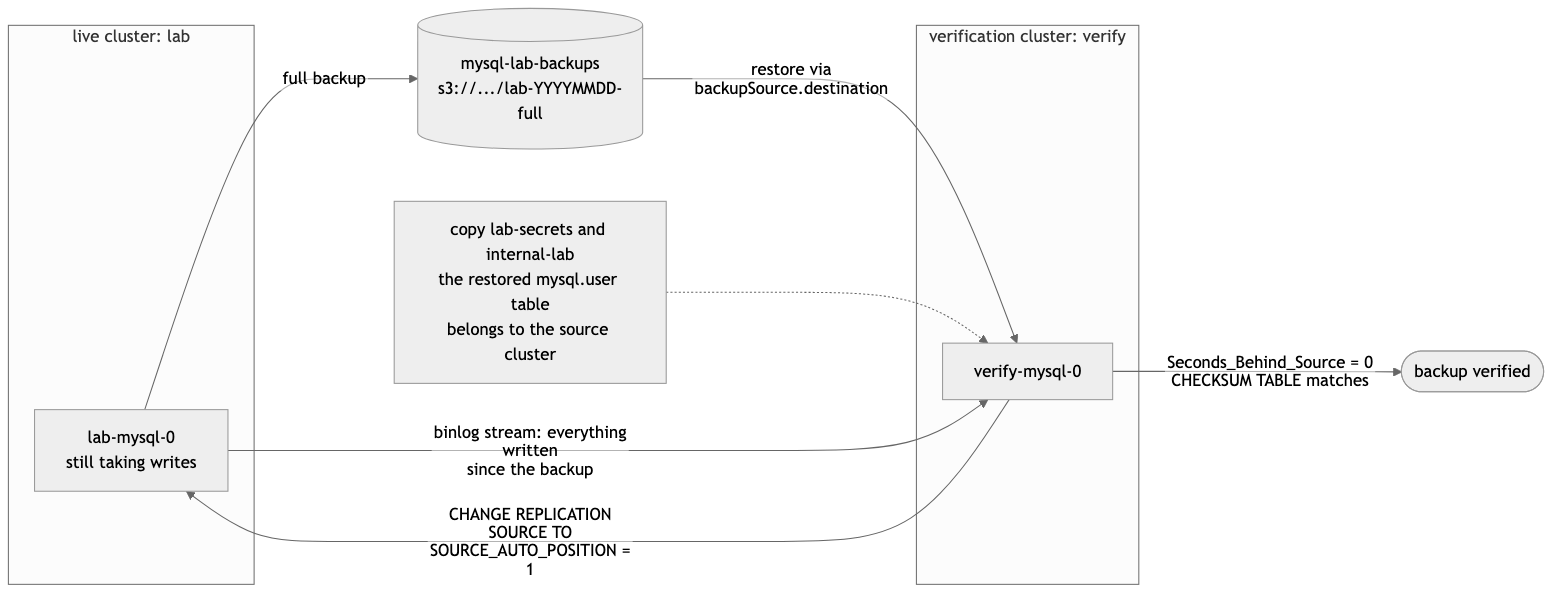
Step 1 — Take a backup, and keep both pieces of its status
- name: Take a dedicated backup for the verification restore
  kubernetes.core.k8s:
    state: present
    definition:
      apiVersion: ps.percona.com/v1
      kind: PerconaServerMySQLBackup
      metadata: { name: t12-base, namespace: "{{ mysql_namespace }}" }
      spec:
        clusterName: "{{ mysql_cluster_name }}"
        storageName: "{{ backup_storage_name }}"
        type: full
ansible/roles/t12_restore_as_replica/tasks/main.yml
t12 takes its own base rather than reusing t01-full, so it can be run alone
on a fresh lab. It is the only restore scenario with no prerequisite, which is
deliberate: the scenario that matters most should be the easiest one to run.
What it keeps from the result is the important part:
- name: Require the base backup and keep its destination
  ansible.builtin.assert:
    that:
      - (t12_base.resources[0].status.state | default('') | lower) in ['succeeded', 'ready', 'done']
      - (t12_base.resources[0].status.destination | default('') | length) > 0
status.destination is the object-storage path. status.storage is the S3
definition the operator used — bucket, credentials secret, endpoint, region, and
prefix. Both are needed. More on why in step 4.
Validation:
BASE_BACKUP=t12-base
BASE_DESTINATION=s3://mysql-lab-backups/lab/lab-2026-09-12-10:36:24-full
Step 2 — Copy the credentials, including the secret you did not create
This is the step that is easy to miss and expensive to debug, and the code says so:
# The restored datadir carries the SOURCE cluster's mysql.user table. A new
# cluster with freshly generated passwords cannot authenticate against the
# data it has just restored, and fails in a way that looks like a restore
# failure but is an authentication failure. So: same credentials.
- name: Copy the lab secrets to the verification cluster's names
  ansible.builtin.shell: |
    set -euo pipefail
    export KUBECONFIG="{{ kubeconfig_path }}"
    NS="{{ mysql_namespace }}"
    copy() {
      src="$1"; dst="$2"
      kubectl -n "$NS" get secret "$src" -o json \
        | python3 -c "import json,sys; d=json.load(sys.stdin); d['metadata']={'name':'$dst','namespace':'$NS'}; d.pop('status',None); print(json.dumps(d))" \
        | kubectl -n "$NS" apply -f - >/dev/null
      echo "COPIED $src -> $dst"
    }
    copy {{ mysql_secrets_name }} {{ verify_cluster_name }}-secrets
    copy internal-{{ mysql_cluster_name }} internal-{{ verify_cluster_name }}
    if kubectl -n "$NS" get secret {{ mysql_cluster_name }}-ssl >/dev/null 2>&1; then
      copy {{ mysql_cluster_name }}-ssl {{ verify_cluster_name }}-ssl
    fi
Why this is necessary
Part 4 established that XtraBackup is a physical backup: it copies the data
directory, and the data directory contains the mysql schema, and the mysql
schema contains mysql.user — the account and password hashes of the source
cluster.
Now create a brand-new verify cluster. The operator generates fresh random
passwords for operator, replication, monitor and the rest, and puts them in
verify’s secrets. The cluster starts. The restore replaces its data directory
with the source’s.
At that moment the operator’s stored passwords are wrong, because the accounts now in the database are the old cluster’s. The operator cannot log in to the database it has just restored. What you see is a crash-looping cluster or a stuck restore — which reads exactly like a corrupt backup, and sends you to inspect the backup instead of the credentials.
The fix is to hand the new cluster the same credentials before it starts.
Three secrets, not one
COPIED lab-secrets -> verify-secrets
COPIED internal-lab -> internal-verify
COPIED lab-ssl -> verify-ssllab-secrets— the user-facing secret from part 2, the one we wrote.internal-lab— operator-generated, holding the working passwords foroperator,replication,monitor,orchestrator,heartbeatandxtrabackup. Copying only the user-facing secret is not enough, and this is the specific mistake that produces the confusing failure above.lab-ssl— the TLS material. Copied only if present, because the replication channel in step 6 usesSOURCE_SSL=1.
How the copy is done
A get -o json, a Python one-liner that replaces metadata wholesale with
just a name and namespace, then apply -f -. Replacing metadata rather than
editing it drops resourceVersion, uid, creationTimestamp, ownerReferences
and annotations in one move. Keeping any of those makes the apply fail — or,
worse, keeps an owner reference that causes the copy to be garbage-collected when
the original is deleted.
d.pop('status', None) handles the case where the source object carries a status
subresource.
The if kubectl get secret … >/dev/null 2>&1 guard makes the SSL copy
conditional without failing the task when the secret does not exist.
This is not a production secret-management pattern. It is a laptop lab with credentials printed in the README. In a real environment the equivalent step is “provision the verification cluster with the same credential material the source uses”, by whatever mechanism you already trust.
Step 3 — A deliberately minimal verification cluster
apiVersion: ps.percona.com/v1
kind: PerconaServerMySQL
metadata:
  name: {{ verify_cluster_name }}          # verify
spec:
  crVersion: "{{ ps_cr_version }}"
  secretsName: {{ verify_cluster_name }}-secrets
  # Not SmartUpdate: the CRD requires Orchestrator for SmartUpdate on an async
  # cluster, and this throwaway verification cluster runs without Orchestrator.
  updateStrategy: OnDelete
  # An async cluster normally must run Orchestrator and HAProxy. This one is a
  # single node that exists only to restore into and replicate from, so both are
  # waived deliberately.
  unsafeFlags:
    mysqlSize: true
    orchestrator: true
    orchestratorSize: true
    proxy: true
    proxySize: true
  mysql:
    clusterType: {{ mysql_cluster_type }}
    size: 1
    image: {{ mysql_image }}
    configuration: |
      [mysqld]
      gtid_mode=ON
      enforce_gtid_consistency=ON
      log_bin=ON
      binlog_format=ROW
      …
  proxy:
    haproxy: { enabled: false, … }
    router:  { enabled: false, … }
  orchestrator:
    enabled: false
  backup:
    enabled: true
    storages:
      minio:
        type: s3
        s3:
          bucket: {{ backup_bucket }}
          prefix: {{ verify_cluster_name }}
          …
ansible/roles/t12_restore_as_replica/templates/verify-cluster.yaml.j2
Decisions worth naming:
One node, no HAProxy, no Orchestrator, no PITR. This cluster exists to restore into and replicate from. A proxy in front of a single node adds nothing; Orchestrator would try to manage a topology that is deliberately a leaf; a binlog server would archive a stream nobody will replay.
updateStrategy: OnDelete, and the comment saying why. The CRD requires
Orchestrator for SmartUpdate on an async cluster, and this one has no
Orchestrator. Without the comment this reads as an inconsistency with the main
cluster; with it, it reads as a consequence.
The unsafeFlags list is longer than the main cluster’s — orchestrator and
proxy are added, because here they are not merely undersized, they are absent.
Waived explicitly, in the manifest, again.
Identical [mysqld] configuration. The GTID settings especially. A
verification cluster with different replication settings would be testing a
different database than the one you back up.
prefix: verify in its own storage definition, so anything this cluster ever
writes lands under a different prefix from the source’s. It never writes anything
in this scenario — but a shared prefix is the kind of thing that only bites once.
Step 4 — Restore from object storage, not from a backup object
- name: Restore the backup into the verification cluster from MinIO
  kubernetes.core.k8s:
    state: present
    definition:
      apiVersion: ps.percona.com/v1
      kind: PerconaServerMySQLRestore
      metadata: { name: t12-restore, namespace: "{{ mysql_namespace }}" }
      spec:
        clusterName: "{{ verify_cluster_name }}"
        backupSource:
          destination: "{{ t12_base.resources[0].status.destination }}"
          storage: "{{ t12_base.resources[0].status.storage }}"
There is no backupName. That field points at a backup custom resource
belonging to the source cluster, and using it here would tie the verification
restore to the cluster it is verifying — exactly the coupling this scenario
exists to avoid. backupSource.destination names an object-storage path, which
is a thing that continues to exist even if the source cluster is gone. That is
what makes this a disaster-recovery rehearsal and not just a copy operation.
The prefix trap
status.storage is copied wholesale, not reconstructed. It is tempting to
hand-write a storage block with the bucket and credentials, since the destination
string already contains the path. That fails:
backup not found in storageThe operator locates the backup using the storage definition, and this lab’s
definition includes prefix: lab (part 2). Supply the bucket alone and it
searches the wrong object prefix and reports the backup as missing — which reads,
once again, like a bad backup rather than a configuration mistake.
This is not hypothetical. The lab’s second shakeout run recorded t12 FAILED in 37 s with exactly that message.
The rendered object, with the validation run’s values:
spec:
  clusterName: verify
  backupSource:
    destination: s3://mysql-lab-backups/lab/lab-2026-09-12-10:36:24-full
    storage:
      type: s3
      s3:
        bucket: mysql-lab-backups
        credentialsSecret: minio-backup-credentials
        prefix: lab
Step 5 — Make the backup provably stale
- name: Write to the live cluster so the backup is provably stale
  ansible.builtin.shell: |
    kubectl -n {{ mysql_namespace }} exec {{ t12_source }} -c mysql -- \
      mysql -uroot -p{{ mysql_root_password }} -N -e \
      "CREATE TABLE IF NOT EXISTS {{ sysbench_database }}.{{ t12_marker_table }}
         (id INT AUTO_INCREMENT PRIMARY KEY, at DATETIME(6));
       INSERT INTO {{ sysbench_database }}.{{ t12_marker_table }} (at)
         SELECT UTC_TIMESTAMP(6) FROM {{ sysbench_database }}.sbtest1 LIMIT 20000;
       SELECT CONCAT('WRITES_AFTER_BACKUP=', COUNT(*)) FROM {{ sysbench_database }}.{{ t12_marker_table }};"
Twenty thousand rows written to the live cluster after the restore was
requested, into a table named post_backup_writes_<epoch> — unique per attempt,
so a leftover table from a previous run cannot be mistaken for this one’s.
This is the scenario’s control. Those rows are newer than the backup, so:
- before replication starts, the restored copy must not have them;
- after catch-up, it must have exactly 20,000 of them.
The first condition is what proves the restored data directory really is that backup, rather than something that was already up to date. Without it, a test that compared two identical databases would pass without the backup having done anything.
Writing during the restore also means the replica has real ground to make up. A verification against an idle source proves far less: replication that has nothing to apply cannot demonstrate that it can apply anything.
Step 6 — Require a distinct identity, then replicate with auto-position
lu=$(ql 'SELECT @@server_uuid'); vu=$(q 'SELECT @@server_uuid')
li=$(ql 'SELECT @@server_id');   vi=$(q 'SELECT @@server_id')
echo "SERVER_UUID live=$lu restored=$vu"
echo "SERVER_ID live=$li restored=$vi"
test "$lu" != "$vu"
test "$li" != "$vi"
test "$(q "SELECT COUNT(*) FROM information_schema.tables
             WHERE table_schema='sbtest' AND table_name='{{ t12_marker_table }}'")" = 0
test -n "$(q 'SELECT @@GLOBAL.gtid_purged')"
echo "RESTORED_GTID_PURGED=$(q 'SELECT @@GLOBAL.gtid_purged')"
Four preconditions before a single replication statement is issued:
- Different
server_uuid. Two servers sharing a UUID in a GTID topology generate colliding transaction identifiers. This is the check that catches a restore which somehow preserved the source’s identity. - Different
server_id. The source disconnects replicas that claim an ID already in use — the same constraint the binlog server’sserverIdlives under in part 7. - The post-backup marker table is absent. Step 5’s control.
gtid_purgedis non-empty. The restored server must know what it contains.
Measured:
SERVER_UUID live=71463f98-ae95-11f1-aeda-1e96d50fb941 restored=e55cafc3-ae95-11f1-a099-1e881dd5cec9
SERVER_ID   live=35921690 restored=39133310
RESTORE_SECONDS=65
RESTORED_GTID_PURGED=5fccd34e-…:1-925,71463f98-…:1-55,a84e643f-…:1-52,d97cef97-…:1-71,f25e09c8-…:1-214
RESTORED_TABLES=10
RESTORED_POST_BACKUP_ROWS=0
Then the replication statement — and it is short, which is the point:
STOP REPLICA;
CHANGE REPLICATION SOURCE TO
  SOURCE_HOST='lab-mysql-0.lab-mysql.mysql.svc.cluster.local',
  SOURCE_PORT=3306,
  SOURCE_USER='replication',
  SOURCE_PASSWORD='…',
  SOURCE_SSL=1,
  SOURCE_AUTO_POSITION=1;
SET GLOBAL super_read_only=ON;
START REPLICA;
No binary-log file name. No offset.
XtraBackup restored gtid_purged along with the data, so the restored server
already knows precisely which transactions it contains.
SOURCE_AUTO_POSITION=1 asks the source for everything after that set. The
entire class of errors that comes from copying coordinates by hand — off by one
file, off by a few thousand bytes, silently skipping or duplicating transactions
— does not exist here.
Two supporting details:
SOURCE_HOSTis the pod’s stable DNS name, not the HAProxy service. The test needs to attach to a specific known server — the one whose GTIDs and checksums it is about to compare against.super_read_only=ONbeforeSTART REPLICA. The verification cluster must not accept a stray write, which would diverge it from the source and make the checksum comparison meaningless.super_read_onlyblocks even users withSUPER.
The password is read at runtime from the copied secret:
REPL_PASS=$(kubectl -n "$NS" get secret internal-{{ mysql_cluster_name }} -o jsonpath='{.data.replication}' | base64 -d)— from internal-lab, which is why step 2 copied it.
Step 7 — Catch up, then prove considerably more than “caught up”
- name: Wait for the restored copy to catch up
  ansible.builtin.shell: |
    kubectl -n mysql exec verify-mysql-0 -c mysql -- \
      mysql -uroot -pmysql -e "SHOW REPLICA STATUS\G" \
      | grep -E 'Replica_IO_Running|Replica_SQL_Running|Seconds_Behind_Source|Last_IO_Error|Last_SQL_Error|Retrieved_Gtid_Set|Executed_Gtid_Set' \
      | sed 's/^ *//' | tr -d '\r'
  until:
    - "t12_repl.stdout is search('Replica_IO_Running: Yes')"
    - "t12_repl.stdout is search('Replica_SQL_Running: Yes')"
    - "t12_repl.stdout is search('Seconds_Behind_Source: 0')"
  retries: "{{ verify_catchup_retries }}"     # 60
  delay: "{{ verify_catchup_delay }}"         # 10
The grep includes Last_IO_Error and Last_SQL_Error even though nothing asserts
on them, so that a timeout records why replication was not progressing rather
than only that it was not.
(The until: conditions are quoted strings. They contain : — and unquoted,
YAML would parse Replica_IO_Running: Yes as a nested mapping instead of a
condition. There is a shipped offline test for exactly this class of mistake;
part 9 covers it.)
Zero lag is where the scenario starts, not where it stops. Seconds_Behind_Source: 0 means the replica has applied everything it has received. It does not mean it
received everything, and it says nothing about whether what it applied was
correct. So:
target=$(ql 'SELECT @@GLOBAL.gtid_executed')
waited=$(qv "SELECT WAIT_FOR_EXECUTED_GTID_SET('$target', 120)")
test "$waited" = 0
A watermark, not a poll. WAIT_FOR_EXECUTED_GTID_SET blocks until the
replica has executed the exact set the source had at that moment, returning 0
on success. This removes the race in which a lag reading of zero is taken
mid-stream.
subset=$(qv "SELECT GTID_SUBSET('{{ t12_restored_gtid }}', @@GLOBAL.gtid_executed)")
test "$subset" = 1
subset=$(qv "SELECT GTID_SUBSET('$target', @@GLOBAL.gtid_executed)")
test "$subset" = 1
gap=$(ql "SELECT GTID_SUBTRACT('$target', '{{ t12_restored_gtid }}')")
Two subset checks and a difference:
- everything the backup contained is still present on the replica — nothing was lost;
- everything the source had at the watermark is present — nothing is missing;
- the difference between them is the work that was actually replayed, which is the measurement worth recording.
The gap is then counted, with a small Python filter over the GTID intervals:
printf '%s' "$gap" | python3 -c 'import sys; s=sys.stdin.read().strip();
  intervals=[i for u in s.split(",") if u for i in u.strip().split(":")[1:]];
  print("GTID_GAP_TRANSACTIONS="+str(sum(int(i.split("-")[-1])-int(i.split("-")[0])+1 for i in intervals)))'
And finally, row by row and table by table:
for i in $(seq 1 10); do
  live_rows=$(ql "SELECT COUNT(*) FROM sbtest.sbtest$i")
  replica_rows=$(qv "SELECT COUNT(*) FROM sbtest.sbtest$i")
  echo "ROWS sbtest$i live=$live_rows replica=$replica_rows"
  test "$live_rows" = "200000"
  test "$replica_rows" = "200000"
  a=$(ql "CHECKSUM TABLE sbtest.sbtest$i" | awk '{print $2}')
  b=$(qv "CHECKSUM TABLE sbtest.sbtest$i" | awk '{print $2}')
  echo "CHECKSUM sbtest$i live=$a replica=$b"
  [[ "$a" =~ ^[0-9]+$ && "$b" =~ ^[0-9]+$ && "$a" = "$b" ]] || mismatch=$((mismatch+1))
done
echo "CHECKSUM_MISMATCHES=$mismatch"
The [[ "$a" =~ ^[0-9]+$ ]] guard is not decoration. CHECKSUM TABLE on a
missing table returns NULL, and NULL = NULL would compare as equal — two
absent tables would “match”. Requiring both values to be numeric first turns that
into a mismatch, which is what it is.
Measured:
CATCHUP_SECONDS=12
RESTORED_GTID_SUBSET=1
SOURCE_GTID_SUBSET=1
GTID_GAP_REPLAYED=71463f98-ae95-11f1-aeda-1e96d50fb941:56-155
GTID_GAP_TRANSACTIONS=100
LIVE_POST_BACKUP_ROWS=20000
REPLICA_POST_BACKUP_ROWS=20000
ROWS sbtest1 live=200000 replica=200000
CHECKSUM sbtest1 live=2265383791 replica=2265383791
…
CHECKSUM_MISMATCHES=0
VERIFY_RESOURCES_REMAINING=0
sbtest2 through sbtest10 matched likewise.
What the four proofs are
Getting to this state proves four things at once that no green job status can:
- The data directory was complete and internally consistent — InnoDB recovered and the server started.
gtid_purgedwas accurate — the server’s idea of what it contains matches reality, or auto-position would have asked for the wrong transactions and replication would have failed or silently skipped.- Transactions written after the backup apply cleanly on top of it — the backup is a valid ancestor of the current production state, not a divergent branch.
- The result is byte-comparable with the source —
CHECKSUM TABLEmatches on all ten tables.
Step 8 — Clean up, and only then declare victory
      always:
        - name: Delete the verification cluster
          kubernetes.core.k8s:
            state: absent
            api_version: ps.percona.com/v1
            kind: PerconaServerMySQL
            name: "{{ verify_cluster_name }}"
            wait: true
            wait_timeout: 300

        - name: Delete the verification restore object and copied secrets
          kubernetes.core.k8s:
            state: absent
            …
          loop:
            - {api: "ps.percona.com/v1", kind: "PerconaServerMySQLRestore", name: "t12-restore"}
            - {api: "v1", kind: "Secret", name: "{{ verify_cluster_name }}-secrets"}
            - {api: "v1", kind: "Secret", name: "internal-{{ verify_cluster_name }}"}
            - {api: "v1", kind: "Secret", name: "{{ verify_cluster_name }}-ssl"}

        - name: Delete the verification cluster's PVCs
          …
          kubectl -n mysql delete pvc -l app.kubernetes.io/instance=verify --ignore-not-found --timeout=180s

        - name: Verify disposable cluster resources are gone
          ansible.builtin.shell: |
            remaining=$(kubectl -n mysql get pods,pvc -l app.kubernetes.io/instance=verify -o name)
            test -z "$remaining"
            echo "VERIFY_RESOURCES_REMAINING=0"

        - name: Require the source cluster to remain healthy after cleanup
          ansible.builtin.include_role:
            name: test_common
            tasks_from: health_gate.yml
Cleanup is in always:, so a failed verification still tears down the cluster it
created. PVCs are deleted explicitly — deleting a PerconaServerMySQL does
not remove its volumes, and a second run would restore into a PVC holding the
previous attempt’s data, which is a genuinely confusing bug to chase.
Then cleanup is verified, not assumed, and the source cluster’s health is gated again. Only after all of that does the scenario record PASS. A verification that leaves the thing it verified in a worse state has not passed.
A shipped offline test enforces this ordering —
test_t12_records_cleanup_failures_and_only_passes_after_cleanup.
Final measured state:
VERIFY_RESOURCES_REMAINING=0
SOURCE_HEALTH_AFTER_CLEANUP=SYSBENCH_TABLES=10 | PRIMARY=lab-mysql-0 | REPLICA_OK=1 | …
Succeeded is not recoverability
The restore object reached RESTORE_STATE=Succeeded at 65 seconds. The
scenario was not finished. Catch-up, the GTID watermark, the gap measurement, the
20,000-row marker, ten checksums, cleanup, and a source health check are the rest
of the proof — and they are the difference between “the restore process
completed” and “the database is usable”.
Doing it by hand
export KUBECONFIG="$PWD/.kube/config"

# 1. a backup, and both halves of its status
kubectl -n mysql apply -f - <<'YAML'
apiVersion: ps.percona.com/v1
kind: PerconaServerMySQLBackup
metadata: { name: t12-base, namespace: mysql }
spec: { clusterName: lab, storageName: minio, type: full }
YAML
kubectl -n mysql get ps-backup t12-base -o jsonpath='{.status.state}{"\n"}{.status.destination}{"\n"}'
kubectl -n mysql get ps-backup t12-base -o jsonpath='{.status.storage}{"\n"}'

# 2. credentials
for pair in "lab-secrets verify-secrets" "internal-lab internal-verify" "lab-ssl verify-ssl"; do
  set -- $pair
  kubectl -n mysql get secret "$1" -o json 2>/dev/null \
    | python3 -c "import json,sys;d=json.load(sys.stdin);d['metadata']={'name':'$2','namespace':'mysql'};d.pop('status',None);print(json.dumps(d))" \
    | kubectl -n mysql apply -f - && echo "COPIED $1 -> $2"
done

# 3. the disposable cluster
kubectl -n mysql apply -f k8s/mysql/verify-cluster.yaml
kubectl -n mysql wait --for=condition=Ready pod/verify-mysql-0 --timeout=15m

# 4. restore from the object store — destination AND storage
kubectl -n mysql apply -f - <<'YAML'
apiVersion: ps.percona.com/v1
kind: PerconaServerMySQLRestore
metadata: { name: t12-restore, namespace: mysql }
spec:
  clusterName: verify
  backupSource:
    destination: s3://mysql-lab-backups/lab/lab-2026-09-12-10:36:24-full
    storage:
      type: s3
      s3:
        bucket: mysql-lab-backups
        credentialsSecret: minio-backup-credentials
        endpointUrl: http://minio.mysql.svc.cluster.local:9000
        region: us-east-1
        prefix: lab
YAML

# 5. write to the live cluster while that runs
kubectl -n mysql exec lab-mysql-0 -c mysql -- mysql -uroot -pmysql -e \
  "CREATE TABLE IF NOT EXISTS sbtest.post_backup_writes (id INT AUTO_INCREMENT PRIMARY KEY, at DATETIME(6));
   INSERT INTO sbtest.post_backup_writes (at) SELECT UTC_TIMESTAMP(6) FROM sbtest.sbtest1 LIMIT 20000;"

kubectl -n mysql get ps-restore t12-restore -w

# 6. identities must differ, marker must be absent, gtid_purged must be set
for q in '@@server_uuid' '@@server_id' '@@GLOBAL.gtid_purged'; do
  echo -n "live $q = ";     kubectl -n mysql exec lab-mysql-0    -c mysql -- mysql -uroot -pmysql --raw -N -e "SELECT $q"
  echo -n "restored $q = "; kubectl -n mysql exec verify-mysql-0 -c mysql -- mysql -uroot -pmysql --raw -N -e "SELECT $q"
done

# 7. attach it
REPL_PASS=$(kubectl -n mysql get secret internal-lab -o jsonpath='{.data.replication}' | base64 -d)
kubectl -n mysql exec verify-mysql-0 -c mysql -- mysql -uroot -pmysql -e \
  "STOP REPLICA;
   CHANGE REPLICATION SOURCE TO
     SOURCE_HOST='lab-mysql-0.lab-mysql.mysql.svc.cluster.local',
     SOURCE_PORT=3306, SOURCE_USER='replication', SOURCE_PASSWORD='$REPL_PASS',
     SOURCE_SSL=1, SOURCE_AUTO_POSITION=1;
   SET GLOBAL super_read_only=ON;
   START REPLICA;"

# 8. compare
kubectl -n mysql exec verify-mysql-0 -c mysql -- mysql -uroot -pmysql -e "SHOW REPLICA STATUS\G" \
  | grep -E 'Replica_IO_Running|Replica_SQL_Running|Seconds_Behind_Source|Last_.*Error'

TARGET=$(kubectl -n mysql exec lab-mysql-0 -c mysql -- mysql -uroot -pmysql --raw -N -e \
  "SELECT @@GLOBAL.gtid_executed" | tr -d '\r\n')
kubectl -n mysql exec verify-mysql-0 -c mysql -- mysql -uroot -pmysql -N -e \
  "SELECT WAIT_FOR_EXECUTED_GTID_SET('$TARGET', 120)"       # expect 0

for i in $(seq 1 10); do
  echo -n "sbtest$i live="; kubectl -n mysql exec lab-mysql-0 -c mysql -- mysql -uroot -pmysql -N -e "CHECKSUM TABLE sbtest.sbtest$i" | awk '{print $2}'
  echo -n "sbtest$i repl="; kubectl -n mysql exec verify-mysql-0 -c mysql -- mysql -uroot -pmysql -N -e "CHECKSUM TABLE sbtest.sbtest$i" | awk '{print $2}'
done

# 9. tear the verification cluster down
kubectl -n mysql delete ps verify --wait --timeout=300s
kubectl -n mysql delete ps-restore t12-restore --ignore-not-found
kubectl -n mysql delete secret verify-secrets internal-verify verify-ssl --ignore-not-found
kubectl -n mysql delete pvc -l app.kubernetes.io/instance=verify --ignore-not-found
Or:
./scripts/lab.sh t12Pitfalls that look like a bad backup
- Secret copy skipped or incomplete. Copy
lab-secrets,internal-labandlab-ssl. Copying only the first produces a crash-loop that reads as corruption. - Storage prefix omitted.
backup not found in storage, on a backup that is perfectly fine. Preservestatus.storage. backupNameused instead ofbackupSource. Couples the verification to the source cluster’s objects and defeats the point.- Identical
server_uuidorserver_id. Assert beforeSTART REPLICA, not after. - Zero lag treated as success. It is a precondition. The watermark, the marker and the checksums are the proof.
- Verification cluster left running. It holds a PVC-sized copy of your database and, on this lab, a second MySQL’s worth of RAM.
A verified restore is also a standby
A backup restored into a cluster that then catches up is a standby. In production, a verified restored copy may be retained as one after the appropriate operational checks — which means verification and capacity can be the same piece of work, paid for once.
What this does not claim
A restored replica that catches up and matches is strong evidence that this backup and replication path work for this dataset: 10 × 200,000 sysbench rows, a laptop kind cluster, operator 1.2.0, the pinned images in the environment snapshot.
It does not replace application-level checks. It does not prove incremental-chain restore (part 4 was explicit about that). It does not prove Orchestrator failover. And the durations — restore 65 s, catch-up 12 s, scenario 118 s — are local-lab timings including waits and checks, not an RTO target.
Next
That is the argument complete. Part 9 is about the machinery that made it trustworthy: how twelve scenarios record their own evidence, why every one of them gates on cluster health before and after, how a failure records what it saw before stopping the run, and the offline tests that check the lab’s own claims about itself.